 how-to
Troubleshooting RV Electrical System Issues: A Step-by-Step Guide
Last Updated: October 23, 2026
Quick Summary
Troubleshooting RV electrical system issues starts by identifying whether the problem is AC (120-volt) or DC (12-volt) power using a simple decision tree: test if 12-volt items like lights work, then test 120-volt items like outlets, then narrow down which specific circuits are affected. Use a multimeter to check battery voltage (expect 12.6-13.2 volts when fully charged), converter output (13.2-14.4 volts), and shore power pedestal voltage (120 volts nominal).
- A healthy RV battery reads 12.6 to 13.2 volts when fully charged; below 12 volts means it is weak or dead.
- Corroded battery terminals block power flow even if the battery is fully charged; clean them with a wire brush and reconnect positive first, negative last.
- A working shore power pedestal reads 120 volts; 0 volts means it is dead or the problem is in your shore cord or inlet.
- Charge your battery every 30 days during storage or it will discharge 1 to 3 percent per month and become dead.
- If a breaker keeps tripping after reset, there is a short circuit or overload; stop using that circuit and call a technician.
Table of Contents
- Understanding Your RV's Electrical System: AC and DC Power
- Diagnosing No DC Power in RV: Battery and Connections First
- RV Battery Maintenance: Prevention and Testing
- RV Shore Power Problems: Pedestal and Inlet Checks
- RV Converter Not Working: Diagnosing Power Conversion Failure
- Flickering Lights and Dim Outlets: Voltage and Wiring Issues
- Breakers, Fuses, and GFCI Outlets: Resetting and Replacing
- When to Stop DIY Troubleshooting and Call a Technician
- Preventive Maintenance to Avoid Electrical Problems
- Frequently Asked Questions
Understanding Your RV's Electrical System: AC and DC Power
Your RV runs on two separate electrical systems, and knowing which one is failing is the single fastest way to start troubleshooting RV electrical problems. Most wasted diagnostic time comes from testing the wrong system first. Use the decision tree below before you touch a multimeter.
AC Power (120-volt system)
AC power comes from shore power at a campground pedestal, an onboard generator, or an inverter that converts battery DC into AC. It is the same 120-volt system your house uses, running your microwave, air conditioner, water heater, and most large appliances.
AC power requires an active source: no shore power, generator, or inverter means no AC. That's why we check the pedestal, shore cord, and inlet first when AC devices stop working.
DC Power (12-volt system)
DC power comes from your battery bank and runs your lights, water pump, furnace ignition, slide-outs, and control boards. It charges via a converter on shore power, the alternator or a DC-to-DC charger while driving, or solar panels.
AC-versus-DC diagnostic decision tree
Work through these questions in order. Stop at the first "yes" and go to that section of this guide.
- Do any 12-volt items work (lights, water pump, furnace fan)?
- No: the problem is DC. Go to the battery and connections section.
- Yes: DC is at least partially working. Continue.
- Do any 120-volt items work when plugged in (microwave, air conditioner, outlets)?
- No: the problem is AC. Go to the shore power section.
- Yes: AC is at least partially working. Continue.
- Do some 12-volt items work but others don't?
- Yes: suspect a branch circuit, fuse, or ground specific to the dead items. Go to the breakers, fuses, and GFCI section.
- Do some 120-volt items work but others don't?
- Yes: suspect a tripped breaker, a GFCI upstream of the dead outlets, or a loose connection on that circuit. Go to the breakers, fuses, and GFCI section.
- Do lights flicker or dim while other items work normally?
- Yes: suspect low voltage or a wiring/connection fault. Go to the flickering lights section.
Safe multimeter procedures and expected readings
A digital multimeter is the core diagnostic tool, and most RV owners can buy a adequate one for under $50 CAD. Safety and correct settings matter more than the brand.
Safety first:
- Never test AC voltage with the meter set to DC or resistance. You can damage the meter and expose yourself to shock.
- Treat all 120-volt AC terminals as live until you have proven otherwise with the meter.
- Keep one hand behind your back or in your pocket when probing live AC terminals to reduce the chance of a current path across your chest.
Common test points and expected readings:
| Test point | Meter setting | Expected reading | What a bad reading means |
|---|---|---|---|
| Battery bank at rest (no load, no charging) | DC volts | 12.6-12.8 V fully charged; 12.0 V is about 50% state of charge; below 11.8 V is critically low | Low reading means charge the battery, then load test it |
| Battery bank while converter or charger is active | DC volts | 13.2-14.4 V depending on charge stage | No rise above resting voltage means the converter or charger is not charging |
| Converter output terminals | DC volts | 13.2-14.4 V | 0 V means the converter is dead; below 13 V under load suggests a failing converter |
| Shore power pedestal outlet | AC volts | 120 V nominal (roughly 114-126 V is a common acceptable band) | 0 V means the pedestal is dead; very low or fluctuating readings mean a bad pedestal or cord |
| RV inlet with shore cord connected and pedestal live | AC volts | 120 V nominal | 0 V means the cord or inlet is faulty |
| GFCI outlet | AC volts | 120 V nominal when reset | 0 V after reset means the GFCI is tripped, failed, or has no upstream power |
Diagnosing No DC Power in RV: Battery and Connections First
When nothing electrical works in your RV, no lights, no water pump, no slide-outs, the problem is almost always DC power. Start here first.
Checking battery voltage with a multimeter
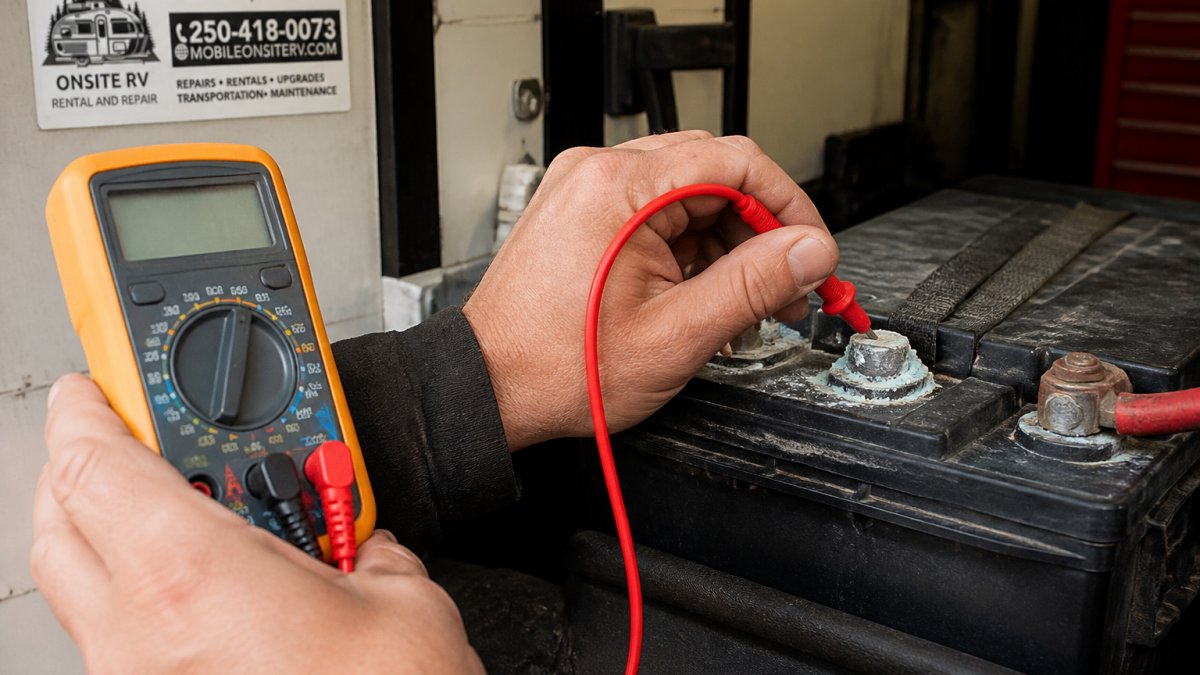
A healthy RV battery reads between 12.6 and 13.2 volts when fully charged. Below 12 volts means it's weak or dead; below 11 volts means it's critically low.
Touch the red probe to the positive terminal (marked +) and the black probe to the negative terminal (marked -), then compare the display to the 12.6-13.2 volt range. A low reading means the battery needs charging; 0 volts means it may be dead or disconnected.
Inspecting terminals and corrosion
Corroded battery terminals block power flow, so even a fully charged battery won't power your RV if the connections are bad. Corrosion looks like white, blue, or green crusty buildup.
Check both terminals and the ground connection. If you see corrosion, disconnect the negative terminal first, then the positive, scrub the terminals, cable ends, and posts with a wire brush, then reconnect positive first and negative last and retest voltage.
RV Battery Maintenance: Prevention and Testing
Regular maintenance stops most electrical problems before they start.
Seasonal charging and storage
Your battery discharges even when your RV sits idle, losing 1-3% of its charge per month in storage. Leave it six months without charging and it will be dead.
Charge your battery every 30 days during storage with a charger or trickle charger rated for RV batteries.
Cold temperatures reduce battery performance, so a battery that works fine in summer might struggle at 0°C (pubmed.ncbi.nlm.nih.gov).
Load testing and health assessment
A multimeter tells you voltage, not battery health: a weak battery reads 12.6 volts at rest but collapses under load. Load testing shows the real story.
A load test pulls current and measures how well the battery holds voltage; dropping below 9.6 volts during a 15-second load test means the battery is failing. For a simple DIY version, turn on your high beams and watch the multimeter: a good battery holds above 10 volts; a drop below 10 volts means it is weak.
For a professional load test, bring your RV to ONSITE RV RENTAL AND REPAIR. A failing battery needs replacement, no amount of charging will fix it.
RV Shore Power Problems: Pedestal and Inlet Checks
When your AC power stops working, shore power is usually the culprit: either the pedestal isn't supplying power or your RV isn't receiving it properly.
Testing the power pedestal with a multimeter
Before you blame your RV, test the pedestal itself. Set your multimeter to AC voltage mode, plug your shore cord into the pedestal, and touch the probes to the outlet terminals (careful, AC power can bite). A working pedestal reads 120 volts; 0 volts means it's dead, so try another outlet and call the campground host if all are dead.
Inspecting the shore cord and electrical inlet
Your shore cord takes a beating from being run over, stepped on, and exposed to weather, so damage is common.
Look for:
- Cuts or cracks in the insulation
- Exposed copper wires
- Melted or burned areas
- Corrosion on the plug pins
A damaged shore cord must be replaced, not taped. Damaged cords are a fire and electrocution hazard.
Check your electrical inlet (the port where the shore cord plugs in) for loose or corroded pins, burn marks, or water inside. Water in the inlet means moisture got inside your RV's electrical system, a serious problem that requires professional repair.
RV Converter Not Working: Diagnosing Power Conversion Failure
Your converter turns 120-volt shore power into 12-volt DC power to charge your battery. When it fails, your battery doesn't charge even when you're plugged in.
Checking converter output and breaker status
Check the converter's breaker and flip it back on if it's tripped; if it keeps tripping, the converter has an internal fault, so don't keep resetting it. To test output, set your multimeter to DC voltage and probe the converter's output terminals (consult your RV manual for the exact terminals).
A failed converter needs replacement. This is not a DIY repair, converters involve high voltage and require professional installation. ONSITE RV RENTAL AND REPAIR handles converter diagnostics and replacement.
Flickering Lights and Dim Outlets: Voltage and Wiring Issues
Flickering or dim lights usually mean low voltage or an intermittent connection: the battery is supplying power, but not enough of it, or the path is unstable. The cause depends on what is powering the RV at that moment, and on whether you have solar, an inverter, a generator, or a lithium battery bank.
Symptoms-to-causes troubleshooting matrix
Use this table to jump to the most likely cause before you start testing.
| Symptom | Most likely causes | First test |
|---|---|---|
| All 12-volt lights dim or flicker together | Low battery state of charge; failing converter; undersized wiring from battery to distribution panel | Battery voltage at rest and while charging |
| One light flickers, others steady | Loose fixture connection; failing LED driver or bulb; corroded socket | Wiggle-test the fixture and inspect the socket |
| Lights flicker only when the furnace or water pump runs | Voltage drop under load; weak battery; loose battery terminal or ground | Battery voltage while the load runs |
| Lights flicker only when the microwave or air conditioner starts | AC load causing voltage sag; marginal shore power; undersized shore cord or adapter | Pedestal voltage while the AC load runs |
| Lights flicker only on solar | Solar charge controller in a charge stage that pulses; loose MC4 or controller connection | Controller status and connection torque |
| Lights flicker only on generator | Generator voltage or frequency instability; transfer switch issue | Generator output at the outlet |
| Lights flicker only on inverter | Inverter overload or low DC input; poor battery-to-inverter cable | DC voltage at the inverter input terminals |
| Outlets dim or devices brown out when AC loads cycle | Loose neutral or ground; poor shore power connection; failing transfer switch | Pedestal voltage and inlet voltage under load |
How solar, inverters, generators, and lithium batteries change the diagnosis
- Solar: A solar charge controller can cause visible flicker when it is pulsing in a charge stage, especially with some PWM controllers. If flicker appears only in daylight and disappears at night, suspect the controller or a loose connection between the panels and the controller. Check the controller's status display and torque the MC4 connectors and controller terminals.
- Inverters: An inverter draws high DC current from the battery. If the cable from the battery to the inverter is undersized or has a poor connection, voltage at the inverter input sags under load, and anything running on the inverter can dim or flicker. Test DC voltage at the inverter input terminals while a load is running; a significant drop compared with battery voltage points to cabling or connections.
- Generators: Generator output can be less stable than shore power, and a failing transfer switch can cause intermittent AC. If flicker happens only on generator, test voltage and frequency at a generator outlet and inspect the transfer switch connections.
- Lithium batteries: Lithium iron phosphate (LiFePO4) banks hold voltage flatter than lead-acid, so a low-voltage flicker is less likely to be a simple state-of-charge issue and more likely to be a BMS cutoff, a loose connection, or a charger not configured for lithium. Check the battery management system status and confirm the converter or charger is set to the correct lithium profile.
Step-by-step diagnosis
- Reproduce the symptom and note the conditions. Battery only, shore power, solar, generator, or inverter? Which appliances are running?
- Test battery voltage at rest and under load. If it is below 12 volts at rest, charge it and retest. If it drops sharply under load, load test the battery.
- Inspect battery terminals and grounds. Corroded or loose connections cause voltage drop that shows up as flicker. Clean and tighten as needed.
- Test converter output if plugged in. A failing converter can cause dim lights even with a good battery.
- Check the specific circuit. For a single flickering fixture, inspect the socket, the LED driver or bulb, and the wire connections at the fixture.
- Check source-specific components. Solar controller, inverter input voltage, generator output, or transfer switch, depending on when the symptom appears.
If terminals are clean, battery voltage is good, and the problem persists, the cause is likely wiring or a source-specific component. Look for loose connections at outlets and fixtures, melted or burned insulation, and kinked or pinched wires under cabinets. Tighten loose terminal screws; replace damaged wiring, which overheats and causes fires.
Breakers, Fuses, and GFCI Outlets: Resetting and Replacing
Breakers and fuses protect your RV from electrical fires. When they trip or blow, something is pulling too much current, so don't just reset them and move on, find out why.
Locating and resetting breakers
Your RV's breaker panel is usually in a cabinet near the kitchen or bathroom. Open it and look for breakers in the off or middle position.
To reset a breaker:
- Flip it fully to the off position
- Wait 5 seconds
- Flip it back to the on position
If the breaker trips again immediately, there's a short circuit or overload. Stop using that circuit and call a technician. Repeatedly resetting a breaker is dangerous.
GFCI outlet resets and testing
GFCI outlets are safety devices in wet areas like bathrooms and kitchens that cut power if they detect a ground fault. Each has a test button and a reset button.
If a GFCI outlet stops working:
- Press the reset button (usually red)
- Test the outlet with a lamp or multimeter
- If it still doesn't work, try resetting the main breaker
- If it still fails, the outlet needs replacement
Test your GFCI outlets monthly. Press the test button; power should cut immediately. Press reset; power should return. If either doesn't happen, the outlet is failing.
Identifying and replacing blown fuses
Older RVs use fuses instead of breakers. A blown fuse looks burned or has a broken filament inside. Never replace a fuse with a higher amperage rating, that defeats the safety protection.
Always replace a blown fuse with the same amperage. Your RV manual shows which fuse is which. If a fuse keeps blowing, something is overloading that circuit. Find and fix the problem before replacing the fuse again.
When to Stop DIY Troubleshooting and Call a Technician
Some electrical problems are beyond DIY repair. Knowing when to stop saves you time, money, and danger.
Call a technician if:
- Your multimeter readings don't match what you expect
- A breaker keeps tripping after you reset it
- You find burned or melted wiring
- Water is inside your electrical inlet or breaker panel
Electrical fires start quietly: damaged wiring, corroded connections, and failed components can smolder for hours before flames appear. If something feels wrong, it probably is. ONSITE RV RENTAL AND REPAIR offers mobile service across Vancouver Island, coming to you for diagnostics and repairs.
Preventive Maintenance to Avoid Electrical Problems
Do this monthly:
- Check battery voltage with a multimeter
- Look for corrosion on battery terminals
- Test GFCI outlets
- Inspect your shore cord for damage
Do this seasonally:
- Clean battery terminals with a wire brush
- Charge your battery if your RV has been sitting idle
- Inspect wiring in cabinets and under the RV
- Test your converter output
Do this annually:
- Have a professional load test your battery
- Inspect your entire electrical system for damage
- Test all outlets and lights
- Check your shore cord for internal damage (a technician can do this)
Regular maintenance catches small problems before they become big ones. A corroded terminal costs $5 to fix now or $500 to fix when it causes a fire later.
Electrical problems don't fix themselves. They get worse until something fails completely. If your troubleshooting rv electrical system issues steps haven't solved the problem, or if you find burned wiring, water damage, or failed components, stop and call a professional.
Frequently Asked Questions
How can I tell whether an RV electrical problem is caused by the battery or converter?
Use a multimeter to test battery voltage first. A healthy 12-volt battery reads 12.6 volts or higher when disconnected. If voltage is low but the battery charges normally on shore power, the converter is likely working. If the battery won't charge even on shore power, the converter may be faulty. Test shore power output at the pedestal before assuming converter failure. A multimeter reading under 110 volts at the pedestal indicates a shore power problem, not a converter issue.
What should I do if my RV has no DC power but AC power works?
No DC power while AC works means your converter isn't converting shore power to 12-volt DC. First, check the converter's breaker inside the RV, it may have tripped. Reset it by switching it off and back on. If the breaker trips again immediately, stop and call a technician; this signals an internal converter fault. Verify shore power is reaching the RV using a multimeter at the electrical inlet. If shore power reads normal but the converter still won't output 12 volts, the converter needs professional service or replacement.
Why does my RV battery keep dying even after I charge it?
Recurring battery drain typically points to a parasitic draw, a faulty converter, or a damaged charging system. Check battery connections for corrosion or loose terminals first. Test the battery with a multimeter after it has been disconnected for 24 hours; if voltage drops below 12.2 volts, the battery may be failing. If the battery holds voltage but drains during use, the converter may not be charging properly. Older batteries naturally lose capacity over time. Battery maintenance includes seasonal charging and load testing to catch declining health before failure.
When should I stop troubleshooting and call a professional RV technician?
Stop DIY work if you encounter burnt wiring, melted connectors, or heat damage inside the electrical panel. If a breaker trips repeatedly after being reset, internal faults exist that require professional diagnosis. If your multimeter readings don't match expected values and simple resets don't restore power, professional testing is needed. Never work inside the main electrical panel if you're unsure of your skills. Call a technician immediately if you smell burning rubber or see sparks, as these indicate serious electrical hazards.